RBXCodes Learn
Why Roblox codes expire
An expired code is usually a normal game decision, not a puzzle you need to defeat. Here is what changes behind the label.
On this page (6 sections)
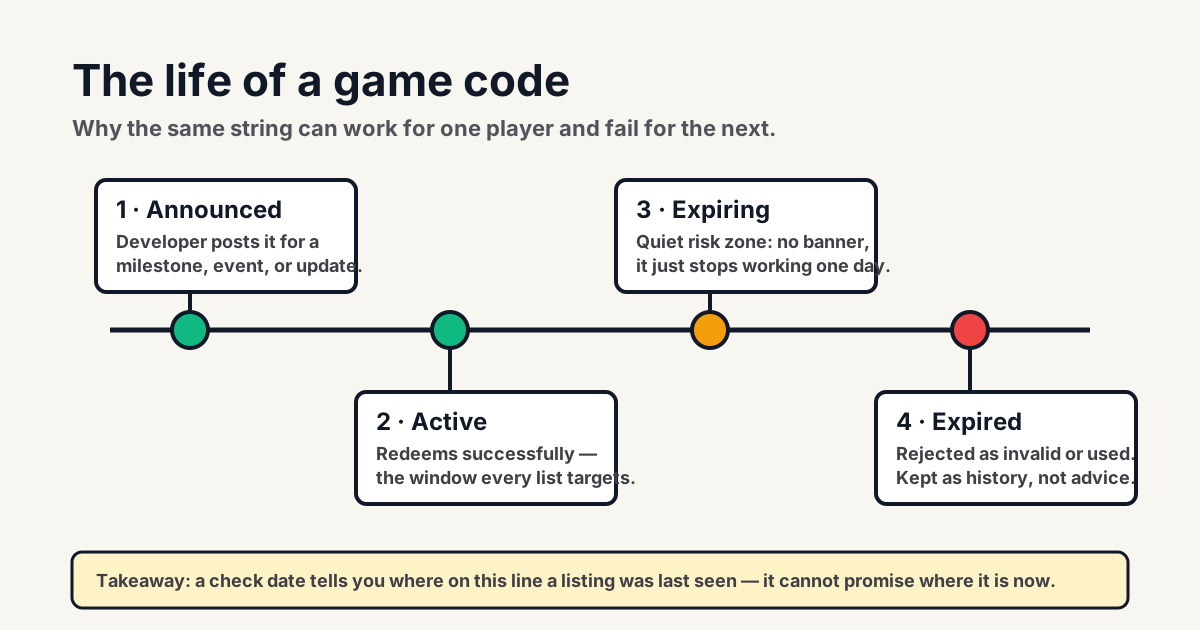
“Expired” can feel like a verdict on the player: you found a code, copied it, and the game said no. In most cases, though, it is simply a decision made by the people who run that particular experience. A code is a switch in a game's reward system. Its creator can turn it on for a launch, milestone, update, or apology, then turn it off when that moment passes. The string may still be visible in old videos and search results long after the switch changes.
That is why a good code page separates current entries from historical ones. An expired list is not pointless clutter when it is labeled clearly; it tells players which claims have been tested and retired instead of quietly repeated. It also explains why a code from a popular video can be real in history yet useless today.
Who controls a game code
Roblox is the platform where experiences run, but individual creators and teams build their own games. In-experience rewards, menus, and code rules are typically configured by those creators. Roblox does not operate one universal pool of game codes that works everywhere. A Blox Fruits-style reward string, for example, cannot be assumed to work in another experience just because it is called a Roblox code.
This distinction also matters when you ask for help. A game developer's announcement can explain an in-experience reward. Roblox Support is the better authority for account access, gift cards, official promotional items, and platform rules. Keeping the scope clear prevents an ordinary expired game code from being confused with a purchased or official code redemption problem.
Why time limits exist
Creators use time-limited codes for practical reasons. A launch code gives early players a small welcome reward. A milestone code celebrates a like, visit, or community target. An update code can bring players back to try new content, while an event code lets a holiday reward end with the event. Sometimes a short-lived code is simply a way to thank players after downtime or a bug fix.
Those uses only work if the code has a boundary. If every historical reward remained available forever, the creator would lose control over the pacing of their economy and the meaning of a timed event. Expiration is not necessarily punishment, and it does not mean the original post was deceptive. It means the availability window was narrower than the life of the internet post that described it.
Expired, invalid, and already redeemed
Games do not all use the same wording. One may say “expired,” another “invalid,” and another may only show a generic failure. Treat those messages as clues, not a uniform legal definition. Expired usually points to a code that once had a window and no longer does. Invalid may mean the string has a typo, belongs to a different game, never existed, or is no longer accepted. Already redeemed means the game believes that account claimed it earlier.
There can be other conditions too. A reward may require a certain level, a fresh server, a group membership, or an update that has not reached every server. Do not assume those conditions exist without the game saying so; invented requirements are another way bad lists sound convincing. First cleanly paste the code in the correct box and read the response. Then compare the response with a dated creator source or a maintained listing.
Updates change the context
Update day is when code information gets messy. Creators may publish a new string, retire an old one, rename a reward, or change the code interface in a single release. Search snippets can lag behind the live page, videos may have been recorded before the update, and players can reach different servers while a rollout settles. A code that was confirmed the previous week has weaker evidence after a big patch than it did before one.
Use update timing as a prioritization tool. Check a recent official announcement or the game's current community channel, then try a listed code once. If it fails, do not treat an old date as proof that the game is broken. Add the failure to the context: perhaps the event ended, the reward rotated, or the video was reporting a moment that has passed.
What to do next
- Confirm that you are in the correct experience and its actual code menu.
- Paste the string exactly once; avoid hand-typing and extra spaces.
- Check whether the page gives a specific result such as already redeemed or expired.
- Look for a recent creator announcement rather than a copied list of older codes.
- Move on if the evidence is old or the game rejects the code cleanly.
There is no harm in checking an ordinary code, but there is also no prize for repeatedly testing a rejected one. The best outcome is a successful reward. The next best outcome is a clear answer that saves time. A maintained expired list and a well-dated source can provide that answer even when there is nothing to claim today.
Do not chase workarounds
A failed code does not become valid because a site asks you to complete a survey, download a program, share a cookie, or sign in away from Roblox. Those steps do not control a creator's in-game reward switch. They only add risk. Roblox's account-safety guidance is explicit that players should only enter login information through the official Roblox site or official apps, and that passwords, cookies, two-step codes, and backup codes should never be shared.
The mature response to an expiration is boring and useful: accept the result, wait for a legitimate new announcement, or enjoy the game without that reward. That protects your account and gives accurate sources a reason to distinguish between current and retired information.
Source and review note
This is independent editorial guidance, reviewed on July 22, 2026. It explains common player-facing patterns; it does not promise that a specific experience will issue, accept, or restore a code. When an account or platform rule is involved, the official Roblox help page is the authority.